
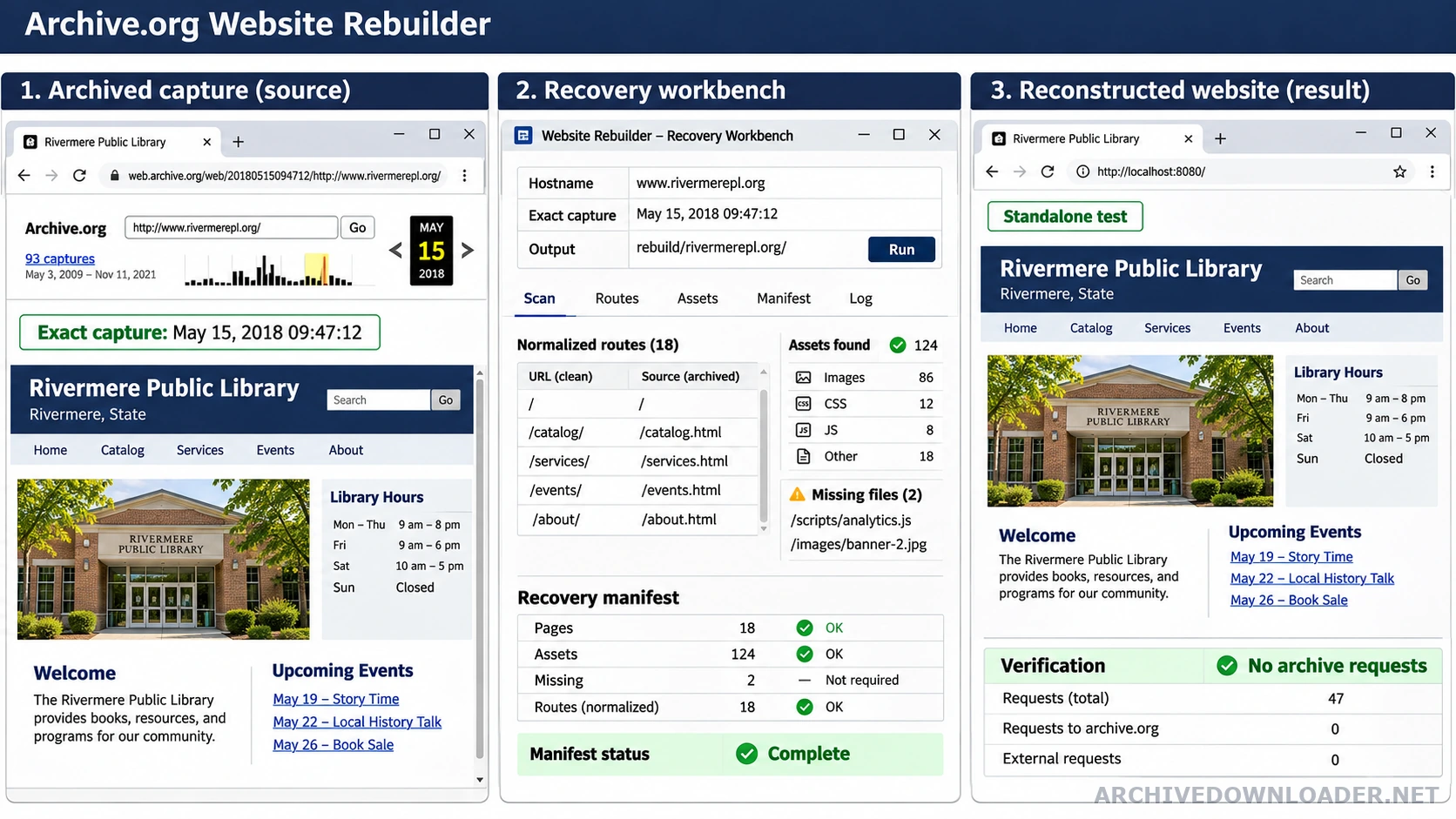
What a website rebuilder can recover
An Archive.org website rebuilder uses public captures as evidence. It can recover saved HTML, visible text, stylesheets, images, fonts, scripts, public documents, and links when those files were captured. It then organizes the files into routes that can run outside the archive. The goal is a working public website package, not a replay page with an archive toolbar attached. Before estimating a full project, use the Wayback Machine downloader guide to understand the files, limits, and evidence a portable package should contain.
A capture is not the same as a hosting backup. It does not contain a private database, account records, environment variables, payment details, unpublished files, or the original server program unless those items were separately supplied by the owner. The guide keeps that boundary clear so a visual page is never mistaken for a recovered private system. When several dates appear usable, compare them with the snapshot selection guide before choosing one exact capture as the starting point.
Start with one exact dated capture
The starting URL should contain a complete capture timestamp and the original website address. A wildcard address containing an asterisk points to a list of captures, so it cannot define one repeatable source. Record the exact replay URL, original hostname, path, response result, and capture time before discovering more pages. This gives the project a fixed point that another reviewer can open later. When you are ready to inspect a timestamped URL, open the Wayback Machine downloader to validate the hostname and estimate the approved page scope.
The starting date does not force every file to come from the same second. A page may refer to an image or stylesheet captured on a nearby date. When a nearby response is used, the manifest should keep both timestamps and explain the substitution. This is more honest than blending several years and calling the result one complete historical backup.
Build a route and asset inventory
The rebuilder follows approved internal links and archive index records to find candidate pages. Each candidate needs a normalized original URL, capture date, response status, content type, and final local route. Replay modifiers, duplicate query strings, slash variants, and redirect targets must be grouped carefully or the inventory will count the same page several times.
Assets need their own records. A stylesheet can request fonts and background images that do not appear in the page HTML. JavaScript can request data or modules after the page loads. A useful inventory connects each required file to the pages that use it. Missing files remain visible in the report even when a broken page element is later removed.
Repair archive paths without changing the evidence
Wayback replay addresses are designed for browsing captures, not for hosting a normal website. A rebuild removes toolbar code and maps replay URLs back to local paths. It also resolves relative links from the correct original page, rewrites stylesheet imports, preserves safe query behavior, and prevents internal navigation from returning to Archive.org. The source URL remains in the manifest even though the public page uses a clean route.
Path repair should be tested at several folder depths. A link that works from the homepage may fail from a nested article. File names can also break on a case-sensitive server even when they worked on a local computer. Testing representative templates catches these problems before thousands of similar routes are generated.
Separate recovered pages from new features
Public captures can show how a search box, contact form, login screen, cart, or account page looked. They usually cannot recover the private logic behind those screens. The current owner must define what the feature should do, what data it may use, where submissions go, and how abuse and privacy are handled. That work is a new implementation based on current requirements.
The same rule applies to missing visuals and licensed material. An owner-supplied file may replace an absent image. A new original illustration may fill the same design role. Either choice should be labeled as a replacement instead of recovered history. This keeps the source evidence, new design work, and current application behavior easy to distinguish.
Prove the rebuilt site stands on its own
A rebuild is not complete while its pages still request HTML, images, styles, scripts, or fonts from Archive.org or the lost website. Serve the result locally or on staging, block both source hosts, and watch the browser network log. Every remaining request should be repaired, deliberately retained as an approved external service, or recorded as an unresolved gap.
The verification sample should include the homepage, a deep page, an image-heavy page, a download, and one page from every template family. Check direct route loading, navigation, responsive layouts, keyboard use, console errors, metadata, canonicals, redirects, and the error page. A screenshot of the homepage cannot prove that the whole package works.
Review the recovery package before publishing
The delivery should contain the standalone site, source manifest, normalized URL inventory, missing-file report, substitution record, broken-link findings, and setup instructions. A framework or WordPress result also needs a route map, content model, build steps, supported dependency versions, environment variable names, and a clear description of newly implemented behavior.
Before launch, review personal information, old contact details, historical prices, tracking identifiers, advertising code, third-party scripts, licensed images, downloadable documents, titles, headings, canonical URLs, robots rules, and sitemap entries. Keep the evidence package separate from the public release so excluded material cannot become public by accident.
Decide whether the archive evidence is strong enough
The best time to narrow or stop a recovery is before a large crawl or rebuild begins. Pause when important templates have no usable capture, the selected dates represent conflicting site versions, ownership is unclear, private data appears in the files, or a required feature depends on source data the owner cannot provide. Record the reason and the evidence that led to the decision.
When the sample is coherent, move to a bounded page inventory and estimate. The estimate should state the approved hosts, path limits, capture policy, expected output, page allowance, and treatment of missing material. This creates a reviewable project instead of an open-ended promise to recover everything the archive may contain.
How to evaluate an Archive.org website rebuilder
A useful evaluation asks whether the delivered site can run without replay services and whether every recovered file can be traced to a capture.
Proof to request
- An exact starting capture, authorized hostname, and written crawl boundary.
- A file manifest containing source URLs, timestamps, response results, and local paths.
- A network test showing that pages no longer request files from Archive.org or the lost origin.
Expected result
A reviewable recovery package containing the standalone website, capture manifest, missing-file report, and setup instructions.
Reason to pause
Stop when the service hides capture substitutions, claims to recover private server systems, or leaves archive replay URLs in the result.
Inspect one exact capture
Use the downloader only after you understand the source records, recovery limits, and standalone checks described in this guide.
Open the Wayback Machine downloader