
The three records to look for
- Source
- One exact replay URL, its original URL, and the authorized host boundary.
- Evidence
- A manifest that records timestamps, response results, MIME types, and final local paths.
- Acceptance test
- Pages load through a local server while archive and lost-origin requests are blocked.
What a Wayback Machine downloader actually does
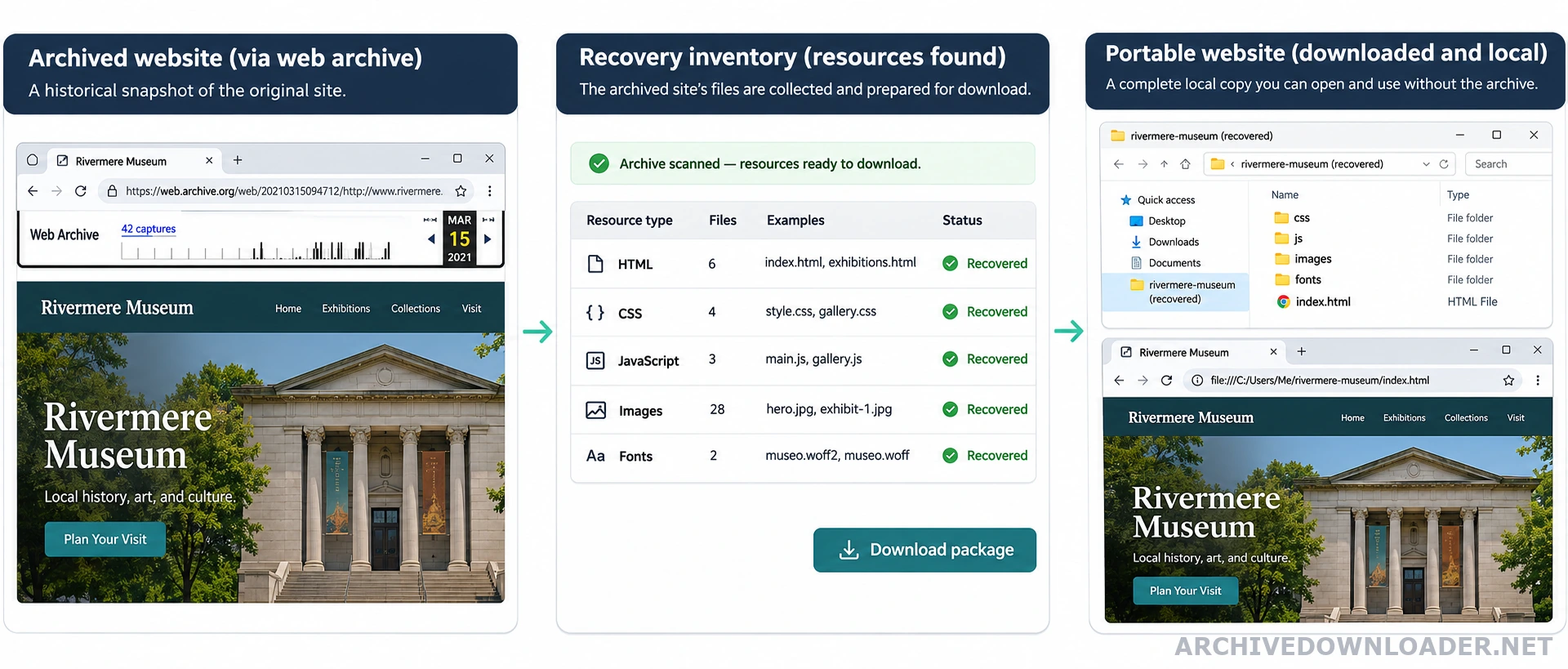
A Wayback Machine downloader requests archived HTML and referenced assets, removes archive toolbar code, rewrites archive URLs, and stores the result in a portable folder. A useful result is not simply a collection of saved pages. Navigation, stylesheets, images, scripts, canonical URLs, and internal paths must agree with one another. Before collecting files, define what a complete result means with the complete website download guide. It explains how to set host, path, and file boundaries before a crawl grows.
Archive captures are observations of a site at particular moments, not conventional backups. One page may come from a different date than its stylesheet or image. A rebuilder therefore needs a deterministic snapshot policy and a record of every substitution it makes. If an original hosting backup may still exist, compare it with Wayback Machine captures and website backups. A backup can contain databases and server settings that a public archive never recorded.
What the download package should contain
A static recovery normally contains HTML, CSS, JavaScript, fonts, images, documents, and a manifest. The manifest is essential: it maps each requested archive URL to the local file, capture timestamp, response status, and content type. That evidence makes broken assets auditable instead of mysterious. Before estimating recovery from one timestamp, audit the exact Wayback Machine capture for page coverage, required assets, redirects, and date consistency.
Server-side features such as account login, search indexes, shopping carts, databases, and form processors are not preserved as executable systems. Their visible pages may be recovered, but the application behavior must be rebuilt separately and tested against a written specification. When the authorized capture and scope are ready, open the Wayback Machine downloader to validate the source and configure the recovery.
A recovery checklist
Start with a homepage capture that loads correctly in the archive. Crawl only the hostname and path you are authorized to restore. Review redirect chains, robots directives, and historical canonical tags. After downloading, test the result with the network disconnected so hidden archive dependencies are easy to spot.
Before publishing, remove analytics identifiers you do not control, replace obsolete contact details, scan downloaded scripts, correct canonical URLs, generate a fresh sitemap, and compare representative templates on mobile and desktop.
How to read the recovery manifest
Treat the manifest as the table of contents for the recovered package. Each row should identify the original URL, the selected capture timestamp, the archive response, the detected content type, the local destination, and the final decision. A delivered file should have a source row. A missing or excluded request should have a reason. This makes it possible to distinguish a bad path rewrite from a resource the archive never stored.
Review HTML separately from assets. For pages, check the final route, title, canonical target, and links to other recovered pages. For CSS and JavaScript, confirm that the saved file is actually code rather than an archived error page. For images and documents, compare the MIME type, file signature, and dimensions where available. A successful HTTP response alone does not prove that the correct file was recovered.
Run a small acceptance test before downloading the whole site
Choose a sample that represents the site rather than only the homepage. Include a deep editorial page, an image-heavy page, a page using a different template, a downloadable file, and one feature that depended on server behavior. Record whether the layout, navigation, main media, metadata, and internal routes survive. This sample exposes missing template assets and unavailable application behavior while the scope is still easy to change.
Serve the sample through a local web server and block requests to web.archive.org and the historical domain. Reload every sample page with the browser cache disabled. Any remaining request to an archive replay, old CDN, dead API, or tracking endpoint belongs in the repair log. The sample passes only when required pages and assets load locally and every deliberate external dependency is documented.
Know when the download needs a rebuild
A static download is appropriate when recovered pages can work as documents with local assets and simple browser behavior. Move to a structured rebuild when editors need reusable content fields, when many pages share a layout that should be maintained once, or when the new site needs current search, forms, accounts, checkout, or integrations. Those features cannot be recovered from their visible historical output alone.
Do not hide the difference by embedding old pages inside a new framework shell. Map the recovered URL inventory to routes, shared templates, content records, and newly specified behavior. Keep the original recovery package unchanged beside the maintainable project so reviewers can trace which parts came from archive evidence and which parts were implemented for the current site.
Wayback Machine downloader evaluation checklist
Judge the downloader by the integrity of its recovered routes and evidence, not only by whether it creates a ZIP file.
Recovery evidence
- The original URL and capture timestamp for every downloaded page and asset.
- A list of redirects, missing resources, cross-date substitutions, and external dependencies.
- A local crawl that checks navigation, stylesheets, images, scripts, and canonical URLs.
Package to expect
A portable site folder plus a manifest that explains how each archived response became a local file.
Warning sign
Stop when saved pages still load replay wrappers, use archive-hosted assets, or combine unrelated design periods without documentation.
Audit one capture first
Validate the date, original hostname, and replay URL before downloading a wider site.
Inspect a Wayback capture