
Understand what can actually be restored
A Wayback Machine capture records public responses that an archive crawler was able to request. That can include rendered HTML, stylesheets, images, fonts, public documents and some JavaScript. It normally does not include a private database, source repository, environment variables, account records, payment credentials or the server-side code that generated a page. A useful restoration begins by separating recoverable public evidence from systems that must be specified and rebuilt. If several dates look usable, start with the snapshot selection guide and compare page coverage, assets, redirects, and design consistency.
Only restore a domain you own or are authorized to recover. Review the recovered material before publication because an old public page can still contain personal details, expired offers, obsolete contact information, third-party trademarks or scripts that should not return to production. Archive Downloader keeps the archive evidence and the deployable rebuild separate so a later editor can tell what was recovered, replaced or intentionally omitted. When the destination needs an editor-friendly publishing system, follow the Wayback Machine to WordPress guide to turn repeated layouts into templates, fields, media, and canonical routes.
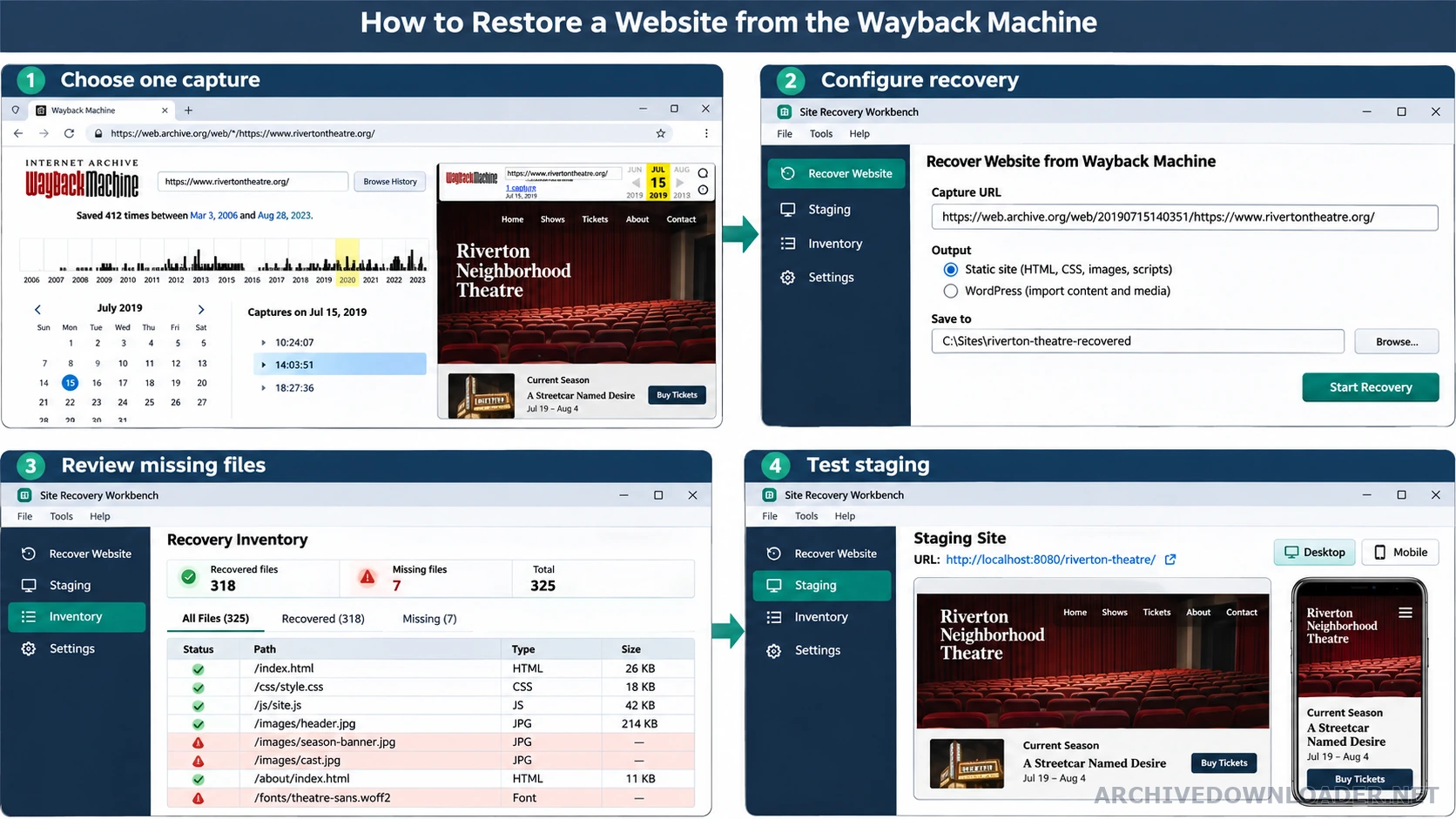
Select one specific dated capture
Open the domain in the Wayback Machine calendar and inspect a highlighted date. A blue capture usually represents a successful response, but the color alone does not prove that its stylesheets, images or inner pages were captured. Open the homepage, several navigation destinations and at least one page from every important layout. Copy the resulting replay URL containing a numeric timestamp and the original URL. For an existing static package, compare the supported website conversion formats before choosing a new Astro, SvelteKit, React, Python, PHP, or content-focused project structure.
Do not submit a wildcard URL containing an asterisk. A wildcard describes a list or range of captures, not one reproducible starting point. Our intake parses the exact timestamp and original hostname before checkout. If a nearby capture supplies a missing asset later, the recovery manifest records that substitution rather than silently presenting several dates as one conventional backup.
Measure whether the site is recoverable
Create a small evidence sample before choosing a rebuild scope. Check the homepage, a deep content page, an image-heavy page, a form or interactive page, and any template that appears only in one section. Record whether each page loads its main stylesheet, logo, navigation, images and downloadable files. Also note redirects and links that unexpectedly jump to a different year or the live web.
The sample reveals which work is recovery and which work is new implementation. A complete visual page with broken search still provides strong layout and content evidence, but search must be rebuilt from current data. A checkout screenshot can establish design intent, but it cannot recover inventory, orders or payment logic. These distinctions prevent an attractive reconstruction from being misrepresented as a recovered application backend.
Choose the output stack before reconstruction begins
The best stack depends on who will maintain the result and what the current site must do. Static HTML is usually the smallest, fastest and easiest option when the recovered site is mostly pages and simple interactions. WordPress is useful when non-technical editors need familiar page and post management. React, Vue and Next.js suit component-based teams and richer interfaces. Flask or Django fits teams that want Python routes, templates and server behavior. Astro is a strong content-first option when most pages can remain static.
This is not a cosmetic export setting. The selection controls the complete project architecture, including routes, reusable layouts, build tooling, dependency files, setup instructions and deployment guidance. Modern framework selections use the managed rebuild plan because translating an entire archived site into reusable components is different from packaging recovered HTML files.
Configure the recovery and start the rebuild
Paste the exact capture URL into the Archive.org website rebuilder, confirm the interpreted domain and date, then select cleanup options. Removing old analytics and advertising scripts prevents recovered pages from contacting accounts you may not control. Broken images and links remain visible in the manifest even when the delivered presentation removes or repairs their page elements. Add a destination URL only when the restored site will use a different hostname or path structure.
Choose the output stack and provide the email that should receive the private ShareIt delivery notice. Confirm authorization, review the checkout plan and complete payment through Stripe. The queued job stores the archive URL, authorized domain, destination, output stack and recovery options. Those values become a bounded reconstruction brief rather than an open-ended request to crawl unrelated hosts or invent missing material.
How the service reconstructs the complete website
The worker inventories recoverable URLs, downloads required public assets, removes archive replay interface code and rewrites internal replay links to local or application routes. It groups pages by shared layout so headers, footers, navigation, article structures and repeated content blocks become reusable templates or components in the selected stack. It does not convert pages into screenshots or leave production pages dependent on Archive.org.
The output includes a README for local setup, production builds, deployment, environment configuration and content editing. Package and dependency files are included when the selected stack requires them. Secrets are represented only as placeholders. The worker also produces a URL and capture manifest, missing-asset report, broken-link report, sitemap and mobile and desktop QA checklist. Missing historical content stays missing or is clearly marked for review rather than fabricated.
Open and verify the ShareIt delivery
When the job completes, ShareIt creates or reuses a private, download-only delivery folder identified internally by a non-reversible value. The delivery email is used to send the folder link and generated password, but it is not displayed as the folder name or exposed on the public delivery page. Entering the password unlocks the folder and its rebuild ZIP. Keep the password outside public tickets or repositories, and download the package to a machine where you can inspect it before publishing.
Unzip the project and begin with its README. Compare the manifest count with the delivered routes, read the missing-file report, and confirm that the selected stack is present throughout the project rather than wrapped around old pages as disconnected embeds. Run the documented local development command and test through a local web server. Opening an HTML file directly does not reproduce routing, asset paths or browser security behavior accurately.
Deploy according to the selected stack
Static HTML can be uploaded to a static host, object storage with a web frontend, or a conventional document root. React and Vue projects normally produce a static build directory unless they use server features. Astro commonly produces static output. Next.js may need a Node-compatible host when server rendering, middleware or server actions are used. Flask and Django require a Python runtime behind a production WSGI or ASGI server. WordPress requires PHP, a supported database and carefully scoped filesystem access.
Do not switch DNS first and troubleshoot later. Deploy to a staging hostname, enforce HTTPS, choose one canonical hostname and test specific redirects. Confirm that deep routes work when requested directly, not only after clicking from the homepage. Where a platform needs route fallback rules, use only the rules documented for that generated project. Blanket redirects to the homepage conceal missing pages and create poor signals for users and search engines.
Complete the launch review
Crawl the staged rebuild and compare it with the recovery manifest. Check one page from every template family on mobile and desktop. Verify titles, one descriptive H1, canonical URLs, status codes, internal links, image alternative text, sitemap entries and robots rules. Block Archive.org and the old origin during the test so hidden external dependencies fail visibly. Scan recovered scripts and downloadable files before they are served publicly.
After launch, monitor not-found responses, server errors, redirect chains and important landing pages. Keep the delivered ZIP and manifest unchanged as the recovery record, then version future edits in a source repository. If a gap is discovered, record whether the correction came from another documented capture, a customer-supplied source file or newly written current content. That evidence makes the website maintainable without pretending the archive contained more than it did.
Restoration scope decision
Choose a restoration plan only after representative captures prove which pages, assets, and behaviors are available.
Prepare before starting
- One exact homepage capture and samples from every important layout.
- Asset coverage for styles, images, fonts, scripts, and public downloads.
- A documented distinction between recoverable public output and unavailable backend systems.
Finished deliverable
An approved restoration scope with the output stack, capture policy, missing-content treatment, delivery format, and launch checks.
Stop the restoration
Stop when essential templates have no usable evidence or when the requested behavior depends on private data that the owner cannot supply.
Which website stack should you choose?
Use the maintenance model and required behavior to choose, not the framework name alone.
Static HTML, CSS and JavaScript
- Best for
- Brochure sites, portfolios, documentation and simple interactions
- Delivered project
- Standalone pages and assets with no package-manager requirement
- Hosting
- Static host, CDN-backed storage or conventional web hosting
WordPress
- Best for
- Teams that want editable pages, posts and a familiar dashboard
- Delivered project
- Maintainable theme, structured content and installation notes
- Hosting
- PHP and a supported MySQL-compatible database
React with Vite
- Best for
- Interactive sites maintained by a React team
- Delivered project
- Component application with explicit routes and production build
- Hosting
- Static hosting for client builds or a platform matching added server services
Next.js
- Best for
- Content-heavy React sites that benefit from rendering and route metadata
- Delivered project
- App Router project with TypeScript and deliberate rendering choices
- Hosting
- Node-compatible or supported serverless platform
Python with Flask
- Best for
- Lightweight Python routes, forms and reusable server templates
- Delivered project
- Flask project with Jinja, pinned dependencies and WSGI entry point
- Hosting
- Python host using a production WSGI server
Python with Django
- Best for
- Structured applications needing content models or administration
- Delivered project
- Django project with routes, templates and justified models
- Hosting
- Python host with database and production WSGI or ASGI server
Vue with Vite
- Best for
- Interactive sites maintained by a Vue team
- Delivered project
- Vue 3 components, explicit routes and production build
- Hosting
- Static hosting for client builds or a platform matching added services
Astro
- Best for
- Content-first sites that should ship minimal client JavaScript
- Delivered project
- Reusable layouts with static output where practical
- Hosting
- Static hosting or an Astro-compatible adapter when server rendering is needed
Restoration and launch checklist
- The submitted replay URL contains one timestamp and no wildcard.
- The authorized hostname and intended destination are correct.
- Representative pages from every layout were checked for archive coverage.
- The delivered project uses the selected stack throughout the website.
- No page, stylesheet, image or script depends on a Wayback replay URL.
- Missing files and cross-date substitutions are recorded in the manifest.
- The local setup and production build complete from the README instructions.
- Deep routes work when loaded directly on the staging host.
- Titles, H1 headings, canonicals, status codes and sitemap URLs agree.
- Old analytics, advertising, credentials and obsolete forms were reviewed.
- Mobile and desktop representatives of every template family were checked.
- DNS changes have a tested rollback path.
Research sources
This tutorial distinguishes official archive behavior from our independent rebuilding workflow.
Test the first page free
Submit one exact homepage capture to see what the archive preserved before planning the complete restoration.
Create a free front-page demo