
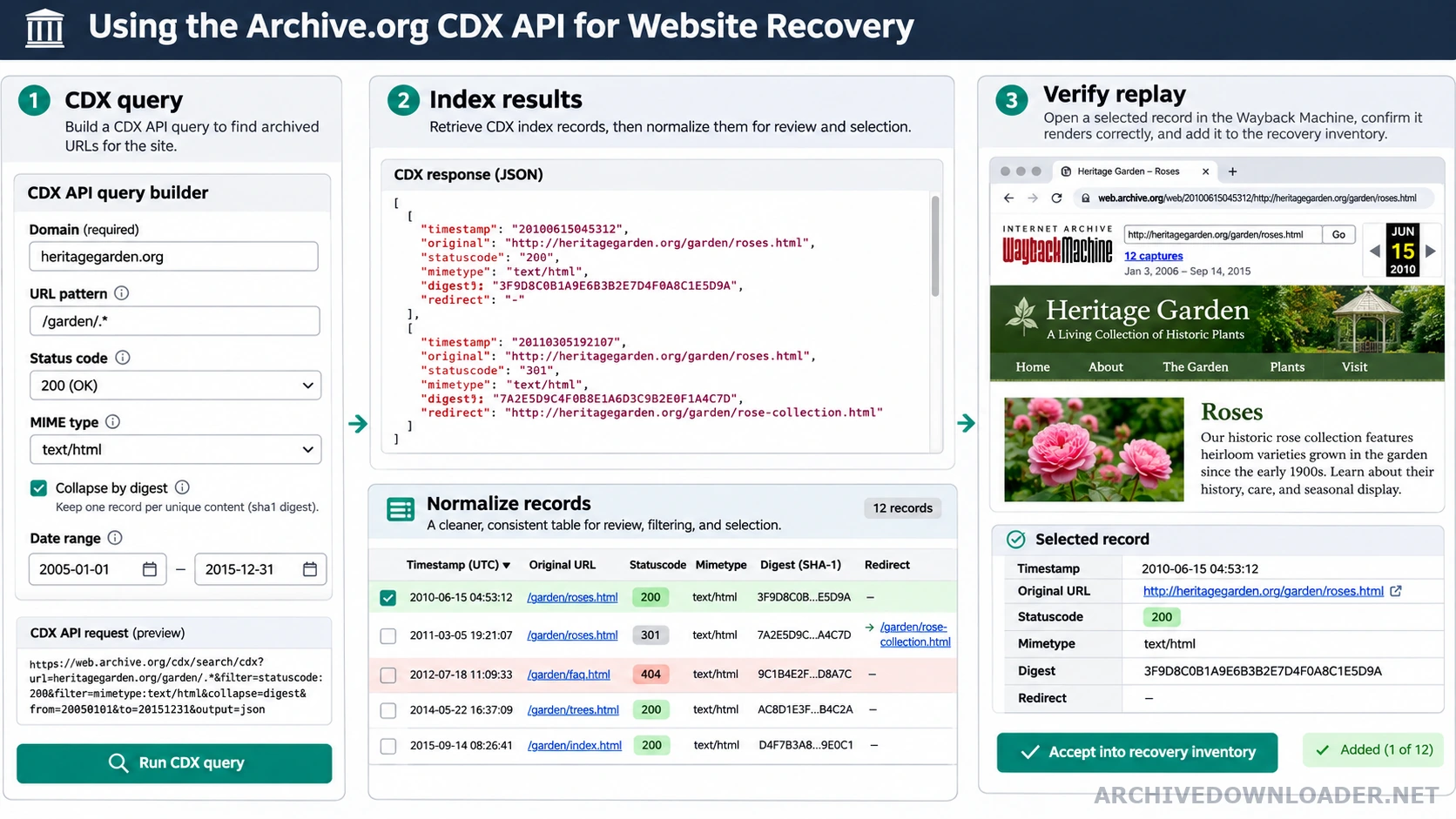
CDX fields used in a recovery inventory
timestamp- When the archive recorded the response.
original- The historical URL requested by the crawler.
statuscode- The recorded HTTP result, which still needs replay verification.
mimetype- The indexed content type, useful for separating pages from assets.
digest- A content fingerprint that can reveal identical responses across timestamps.
redirect- A target recorded for redirect responses and cross-host checks.
What the CDX index provides
A CDX record describes a captured request with fields such as timestamp, original URL, status code, MIME type, digest, and redirect target. It is an index of observations, not a guarantee that every replay will return a complete or usable file. Parse replay and original addresses with the Wayback Machine URL format guide before deduplicating records or assigning local paths.
For recovery planning, query only the authorized hostname and the smallest useful path prefix. Request the fields needed for decisions and page through results predictably. Store the raw query and retrieval time with the inventory so the research can be reproduced. Use the resulting inventory with the complete website download guide to define crawl boundaries and reconcile recovered, redirected, excluded, and missing resources.
Reduce noise without losing evidence
Collapse identical content digests when several timestamps contain the same response, but retain the earliest and latest occurrence in the manifest. Separate successful HTML, redirects, client errors, server errors, and non-HTML assets before estimating page coverage. Submit the chosen exact capture through the Wayback Machine downloader when the inventory is ready for a scoped recovery estimate.
Tracking parameters, session identifiers, calendar URLs, and crawler traps can produce huge URL sets with little unique content. Normalize them with written rules and keep a count of discarded variants. Never infer a missing page merely from a similar URL.
Use metadata to guide replay checks
Choose a small candidate set from the index, then verify actual replays and their dependencies. MIME labels and status codes can be incorrect, redirects can cross hosts, and a successful page can still depend on uncaptured styles or images.
Build a bounded query and preserve it
Start with the smallest hostname and path prefix that covers the authorized project. Request explicit fields such as timestamp, original, statuscode, mimetype, digest, and redirect. Use predictable pagination or resume keys for larger result sets. Save the exact query, retrieval time, and raw response before applying filters so another reviewer can reproduce the inventory.
Treat broad wildcard queries cautiously. A domain can contain years of crawler traps, tracking variants, calendars, session URLs, alternate hosts, and unrelated historical sections. Querying everything first may produce a large number that looks authoritative but provides little information about the pages the owner actually needs.
Deduplicate records without deleting the history
Group by normalized original URL, then separate statuses and MIME types. Content digests can identify repeated responses across timestamps, but keep the first and last observed capture plus the selected recovery capture. Do not collapse records solely because their filenames match or their status codes are the same.
Create explicit buckets for successful HTML, redirects, client errors, server errors, assets, and unknown types. Track how many variants each normalization rule removes and retain examples. This lets an editor distinguish genuine page coverage from duplicated parameters and prevents a deduplication rule from silently discarding a meaningful language or pagination URL.
Verify a sample before estimating recoverability
Select representative records from every major template, status group, asset type, and time period. Open the actual replay and check its dependencies. Indexed status and MIME fields can be incomplete or misleading, redirects can cross domains, and a successful HTML capture can still lack its stylesheet or main images.
Use the verified sample to estimate likely page coverage and repair effort, then state the uncertainty. The final manifest should connect selected CDX records to replay checks and delivered paths. CDX data is valuable discovery evidence, but the package should never claim a file was recovered until its response and content were validated.
CDX inventory design checklist
Use CDX results as a discovery inventory that still requires normalization, scope checks, and response validation before recovery.
Fields to retain
- The query host, path filters, date window, result fields, pagination behavior, and collapse rules.
- Original URLs, timestamps, status codes, MIME types, digests, and redirect results needed for deduplication.
- Representative replay checks for records selected by automated inventory rules.
Inventory output
A deduplicated candidate URL table with a recorded rule for selecting captures and excluding out-of-scope or non-content responses.
Misleading result
Stop when query limits truncate results, replay modifiers are counted as pages, or status and MIME fields are treated as proof of complete content.
Move from index to verified capture
Use CDX records for discovery, then validate a real replay before treating a URL as recoverable.
Verify a capture