
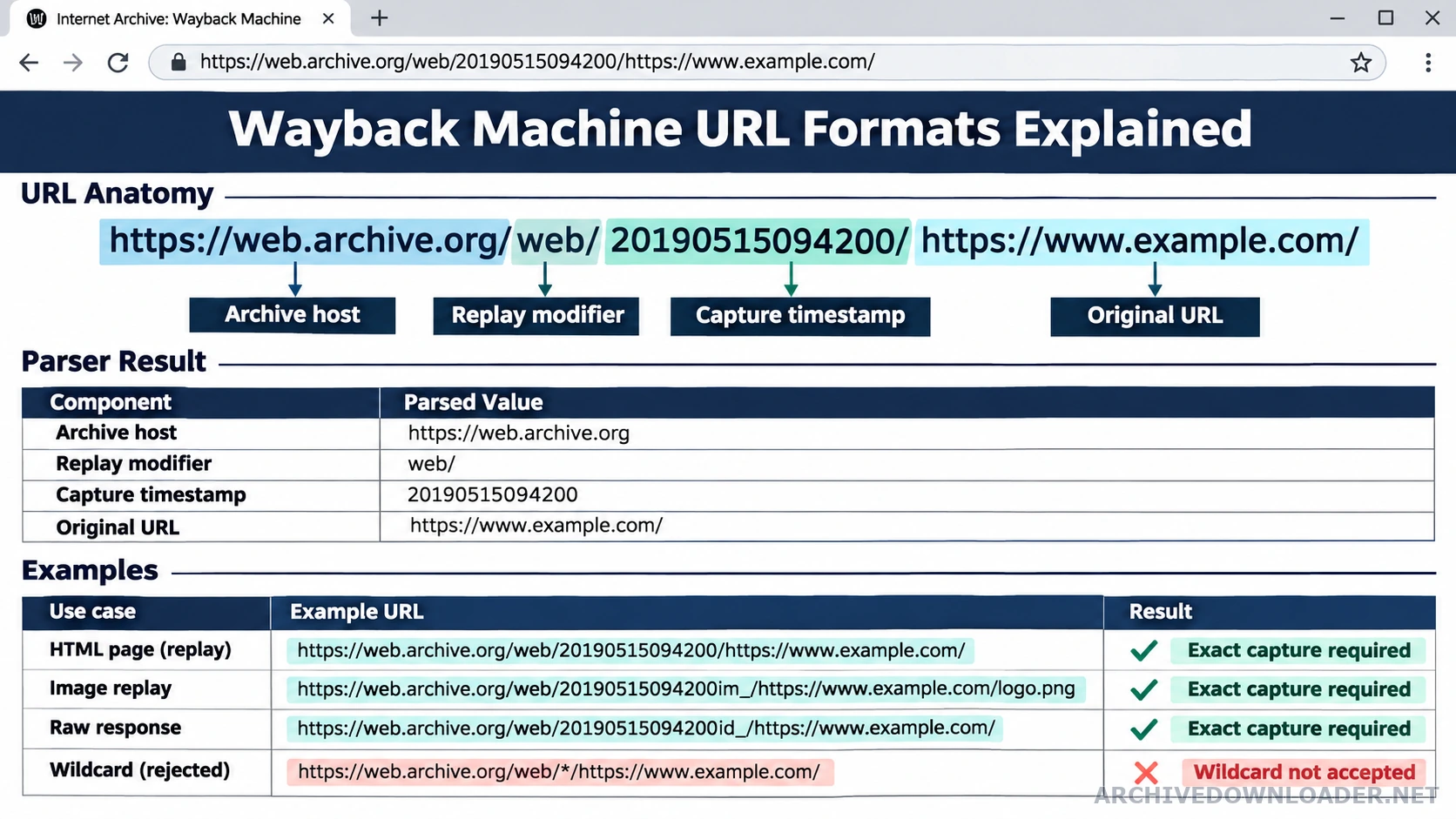
Anatomy of an exact replay URL
| Part | Example | Meaning |
|---|---|---|
| Archive host | https://web.archive.org/web/ | Identifies the replay service, not the recovered site's final hostname. |
| Capture timestamp | 20230501000000 | Fourteen UTC digits for year, month, day, hour, minute, and second. |
| Replay modifier | id_ or im_ | An optional archive instruction that must be parsed separately from the date. |
| Original URL | https://example.com/path?view=full | The historical scheme, host, path, and query that the capture represents. |
The main URL parts
A typical replay URL contains the archive host, the word web, a numeric capture timestamp, and the original URL. The timestamp is normally expressed as year, month, day, hour, minute, and second in UTC. The original URL can itself contain a path and query string. Apply the normalized fields in the CDX API recovery guide to group records by original URL, status, type, digest, and capture time.
Replay modifiers
Archive replay systems can add modifiers near the timestamp to request a less rewritten representation or a specific asset mode. Recovery software should parse these markers explicitly instead of assuming every character after web/ belongs to the date. When several valid timestamps remain, use the snapshot selection guide to choose a coherent starting date instead of mixing captures silently.
Validate before crawling
Confirm that the parsed original hostname matches the authorized domain, normalize internationalized hostnames, reject embedded credentials, and allow only HTTP or HTTPS source URLs. Display the interpreted timestamp and host to the customer before payment. Once the replay URL is exact, paste it into the Wayback Machine downloader to validate the hostname and configure an authorized recovery.
Keep the full replay URL alongside the parsed values in the order record. That makes it possible to reproduce the initial decision, diagnose an incorrect capture later, and distinguish customer input from URLs discovered by the recovery crawler.
Recognize replay modifiers without corrupting the timestamp
The segment after /web/ can contain a 14-digit timestamp followed by a replay modifier. Treat the digits and modifier as separate fields. The modifier affects how Archive.org serves a stored response, while the timestamp records the capture time. Do not include either field in the recovered site's final local path.
Keep the original URL intact after the replay prefix. It may contain its own scheme, port, path, encoded characters, query string, or fragment. Parse it as a URL rather than splitting on every colon or slash. Fragments are browser navigation and normally do not identify a separate server response, while query parameters may or may not represent distinct content.
Reject ambiguous or unsafe input early
Require an HTTP or HTTPS original URL and a complete numeric timestamp for a reproducible starting capture. Reject an asterisk because it represents a calendar or range rather than one response. Reject embedded credentials, malformed hostnames, unsupported schemes, and a replay URL whose parsed original host falls outside the authorized domain.
Display the interpreted capture time and original hostname before a user continues. Store the submitted replay URL beside the parsed fields so the decision can be reproduced. A parser should fail with a specific message, such as a missing timestamp or wildcard capture, instead of silently guessing a date or dropping part of the original address.
Normalize URLs for inventory without erasing meaning
Normalize scheme and host casing, default ports, dot segments, and encoded forms according to a written policy. Decide how trailing slashes and index filenames map to final routes. Remove known tracking parameters only when they do not change the response. Keep language, filter, pagination, view, and document parameters when they produce content the approved site needs.
Retain both the original observed URL and the normalized recovery key. This makes deduplication reviewable and allows redirects to be generated from real historical variants. When two addresses look similar but return different content, keep both until an editor decides their final canonical relationship.
Replay URL parsing checklist
Parse the archive host, timestamp, replay modifier, and original URL separately before using a replay address as recovery evidence.
URL fields
- The complete replay URL copied after opening one specific dated capture.
- The original scheme, hostname, port, path, query string, and fragment treatment.
- Any replay modifier, redirect, encoded URL, wildcard, or timestamp change introduced by navigation.
Parsed record
A normalized capture record containing the exact replay source and the corresponding original URL components.
Invalid input
Stop when the URL contains a wildcard, omits a reproducible timestamp, or resolves to a different original hostname than the authorized target.
Try an exact archive URL
Paste one replay URL with a complete timestamp to see how the host and capture date are interpreted.
Check an archive URL