
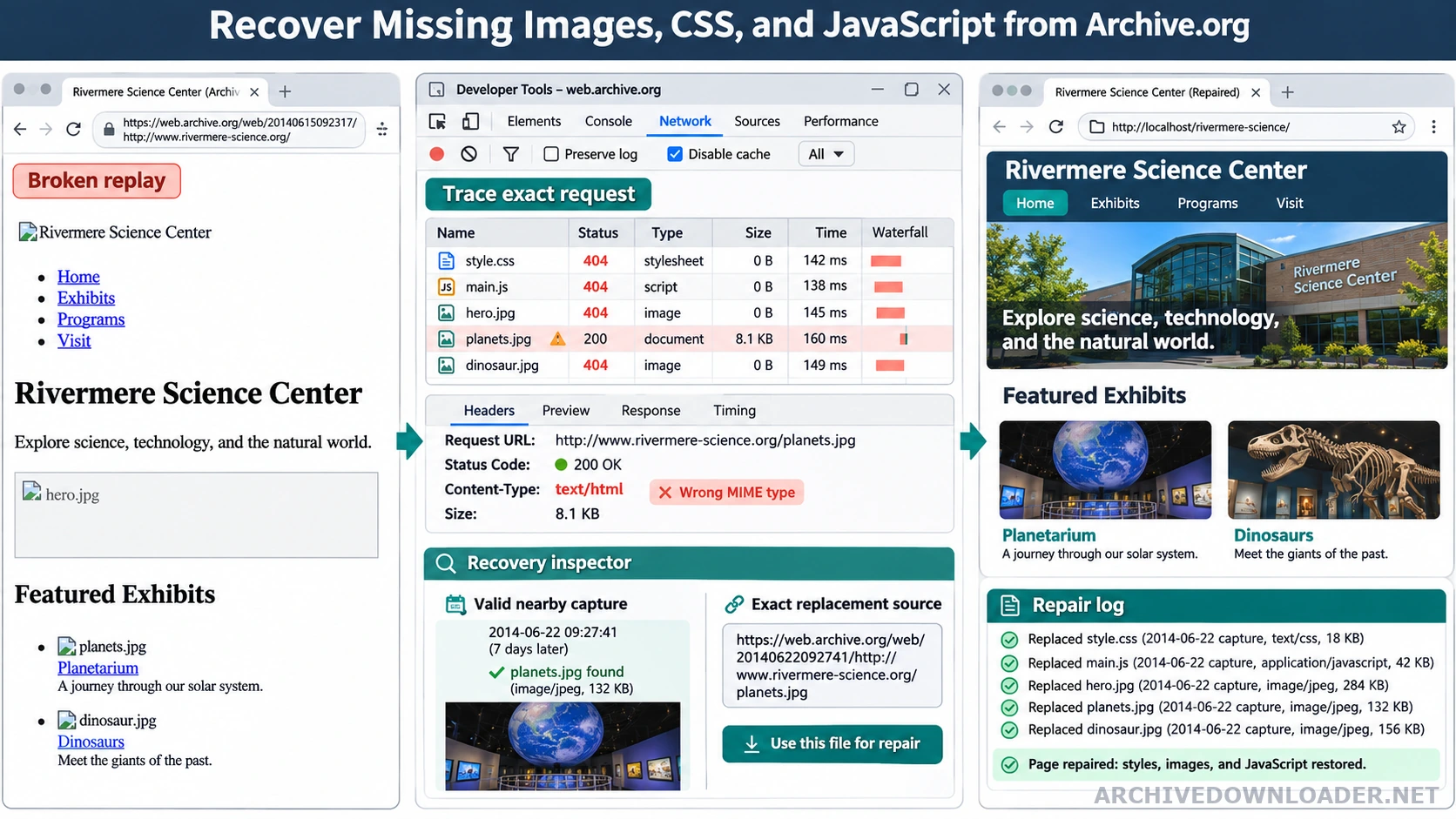
Start with the visible symptom
| Symptom | Likely cause | First check |
|---|---|---|
| The page has no styling | A stylesheet replay is missing, saved as HTML, or still points to an archive wrapper. | Inspect the CSS request status and content type. |
| Images show broken icons | The source uses another host, responsive source attribute, redirect, or uncaptured file. | Trace the exact requested image URL from the page. |
| Fonts or backgrounds are absent | Nested CSS imports and url() dependencies were not inventoried. | Parse the recovered stylesheet before changing the markup. |
| Interactive controls do nothing | A script, module, API response, or original backend behavior is unavailable. | Separate recoverable JavaScript from behavior that needs a new specification. |
Why archived assets go missing
The page may reference a different hostname, a protocol-relative URL, a CSS import, or an asset loaded by JavaScript after the initial capture. Some resources were excluded, blocked, or never requested by the archive crawler. First confirm that the page and asset belong to a coherent date with the snapshot selection guide. A broken page can be a date mismatch rather than a path error.
Repair in dependency order
Start with HTML, then stylesheets, fonts, images, and scripts. Parse CSS url() and import rules before judging visual completeness. Preserve content types and file extensions so browsers interpret the restored files correctly. After repairs, follow the static website deployment guide to verify MIME types, cache rules, deep paths, and archive independence on the public host.
Use the browser network panel and a local crawl report to find requests that still point to archive hosts. Check responsive image attributes, inline style blocks, web manifests, source maps, and font declarations because these dependencies are easy to miss in a simple HTML link scan. For a managed inventory of missing and recovered assets, start with the Wayback Machine downloader and one exact authorized capture.
Do not hide failures
A broken-image remover can improve presentation, but it should not erase the recovery record. Keep missing resources in the manifest with their referring page and attempted capture dates. This gives an editor a concrete repair queue.
Trace the dependency from the page that requested it
Start with the archived page and capture the exact failing request. For an image, inspect src, srcset, picture sources, CSS backgrounds, lazy-load attributes, and any base element that changes relative paths. For CSS, follow imports and nested url() references. For JavaScript, check module imports, chunk manifests, source maps only when useful, and network calls to APIs that were never static files.
Normalize the original request before searching for captures. Remove the replay host and timestamp while preserving the original scheme, hostname, path, and meaningful query. Check redirects and encoded characters. A filename search alone can select the wrong asset when several hosts or versions used the same basename.
Verify that a recovered response is the expected file
An archive replay can return HTML with a successful status where the page expected an image, stylesheet, or script. Check the response content type and the file signature, then open or parse the result. Images should decode and report sensible dimensions. CSS should parse as CSS. JavaScript should be reviewed as code and scanned before execution. Fonts and documents need the same content-type and signature check.
Keep the source URL, timestamp, response status, MIME type, checksum, and local destination in the manifest. If several candidate captures exist, compare checksums and visible output. This evidence prevents an archive error page from being renamed with a .jpg or .css extension and silently shipped as a repaired asset.
Use a repair order that preserves evidence
First try the exact requested capture. Next, search the approved nearby date window for the same original URL. Then check an approved first-party asset host or an owner-supplied original. Recreate a visual only when the owner has authorized a replacement and the result is clearly new work rather than a claimed historical recovery. Never invent text, data, or application behavior to make the package appear complete.
After repairing a dependency, reload the representative page with archive and old-origin traffic blocked. Check desktop and mobile layouts because responsive images and conditional bundles may request different files. Keep unresolved items in the missing-file report even if the broken element is removed from the public presentation.
Archived asset diagnosis checklist
Diagnose the failed request before replacing or removing an element because missing capture, wrong path, MIME mismatch, and blocked execution require different fixes.
Signals to inspect
- The referring page, requested asset URL, capture timestamp, response status, and content type.
- CSS imports, responsive image candidates, script-created requests, font declarations, and alternate asset hosts.
- A local network log showing which requests still reach archive or obsolete origin domains.
Repair log
An asset disposition list that marks each file as recovered, corrected, substituted with evidence, intentionally removed, or still missing.
Unsafe repair
Stop when an image response contains HTML, a stylesheet has the wrong content type, or a replacement cannot be tied to authorized evidence.
Trace the broken archive request
Start from the exact page capture so missing styles, scripts, and images can be tied to a reproducible source.
Validate the source capture