
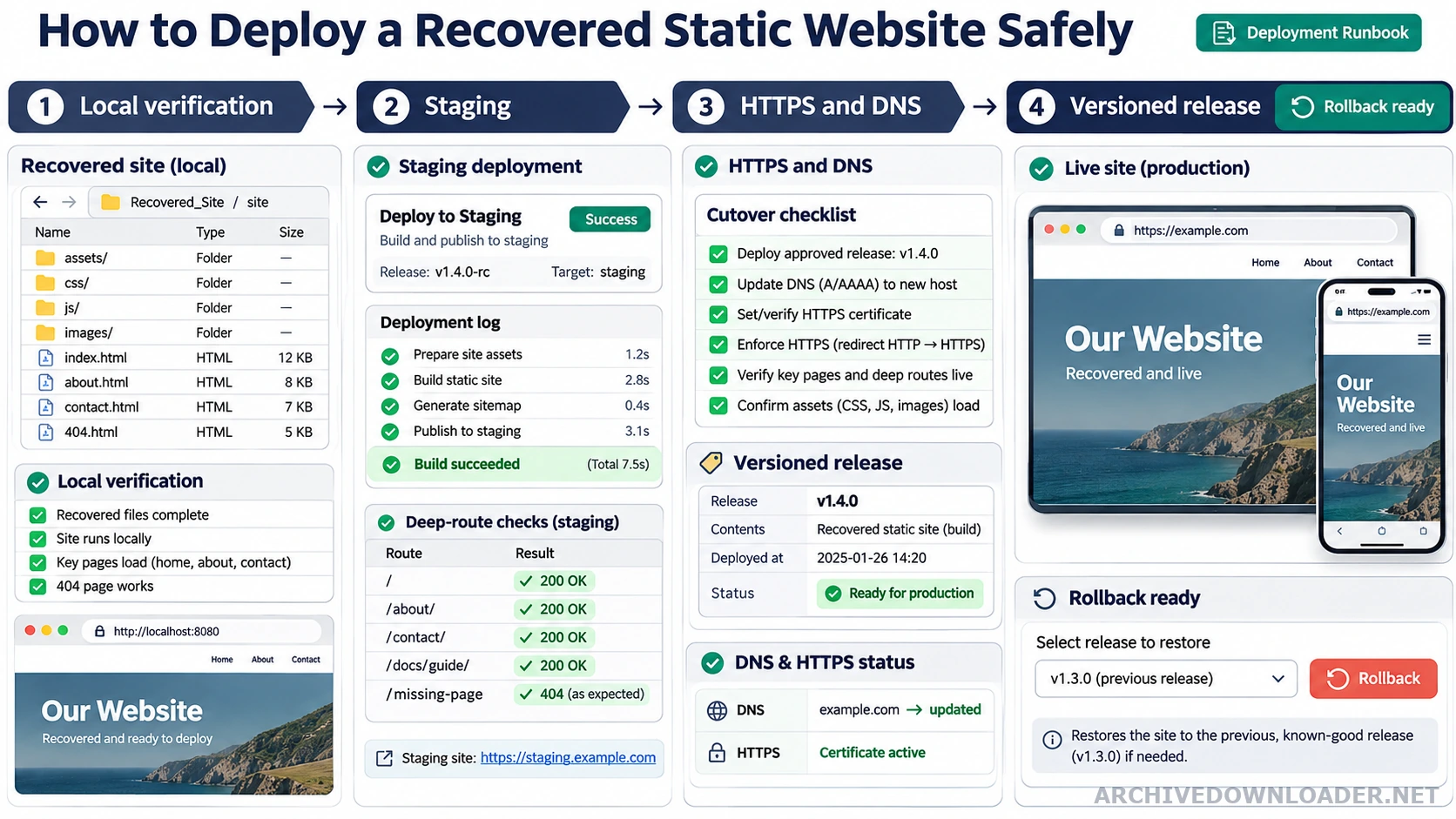
Deployment checkpoints
- Before upload
- Serve the build locally, block archive requests, scan files, and verify deep routes.
- On staging
- Test HTTPS, canonical host rules, MIME types, error responses, forms, and responsive layouts.
- At cutover
- Use a versioned artifact, record DNS changes, and keep the previous release available.
- After release
- Crawl from outside the deployment network and monitor errors, redirects, and important landing pages.
Test in isolation
Serve the recovered folder through a local HTTP server with external network access blocked. Crawl every internal link and record requests that still reach archive hosts, analytics services, advertising networks, dead APIs, or third-party scripts. Complete the recovered website SEO checklist before cutover so redirects, canonicals, internal links, and sitemap URLs agree.
Scan JavaScript and downloadable files before deployment. Remove obsolete forms and credentials, update contact and privacy information, and decide whether historical interactive code should be replaced, disabled, or rebuilt. If the build still has missing resources, return to the image, CSS, and JavaScript recovery guide before long cache lifetimes make faulty assets harder to replace.
Configure the public host
Enable TLS, choose one canonical hostname, set specific redirects, and return correct error responses. Apply long cache lifetimes only to versioned assets. HTML should use shorter cache rules so corrections and legal updates can be published promptly. When a verified static package must become a framework-native project before deployment, use the website stack converter and preserve the validated public route map.
Launch with a rollback path
Keep the reviewed build artifact immutable, deploy it to a versioned release directory, and switch traffic through a reversible pointer or platform release. Verify the homepage, a deep page, an image-heavy page, redirects, sitemap, robots file, and error page from outside the deployment network.
Preserve the original recovery manifest separately from the deployed site. If a later correction changes a file, record whether it fixes a recovery error, updates current business information, or modernizes the implementation.
Create one immutable release artifact
Build the reviewed site once and give the artifact a version or checksum. Deploy that same artifact to staging and production instead of rebuilding from a changing workspace at each step. Include the generated pages, assets, redirect configuration, robots file, sitemap, error page, and a release manifest. Keep the previous known-good artifact available for rollback.
Before upload, serve the artifact locally with archive and historical-origin requests blocked. Crawl deep routes, validate links, open representative layouts, and inspect console and network errors. Confirm that filenames and letter casing work on the target platform, because a package that succeeds on a case-insensitive development filesystem may fail on a case-sensitive host.
Set headers and cache rules by file type
Serve HTML with the correct text/html content type and a cache policy that allows corrections to propagate. Versioned CSS, JavaScript, fonts, and images can use longer cache lifetimes when their URLs change with their content. Do not apply an immutable year-long cache to unversioned files that the owner expects to replace at the same address.
Enable HTTPS, redirect one canonical host variant to the other in a single hop, and add security headers appropriate to a static site. Prevent MIME sniffing, set a deliberate referrer policy, and use a content security policy only after testing every required first-party and approved third-party resource. A copied policy that blocks the site's own fonts or scripts is not a security improvement.
Cut over with observable checks and a rollback trigger
Lower DNS time-to-live only when the existing provider and change window justify it. Verify the staging host from outside the deployment network, then switch traffic without deleting the previous release. Test the homepage, deep routes, redirects, error responses, sitemap, robots file, primary images, and any approved forms immediately after cutover.
Define rollback triggers before launch, such as widespread 404 responses, missing styles, certificate failure, incorrect canonical host behavior, or broken primary conversions. Monitor access and error logs during the first release window. When the site is stable, preserve the release record and schedule a later review of redirects, indexing, cache behavior, and unresolved recovery gaps.
Static recovery deployment gate
Publish only a reviewed, archive-independent build that can be rolled back and whose public HTTP behavior matches the launch plan.
Release inputs
- A clean local build, dependency scan, file hashes, and network test with archive and old-origin hosts blocked.
- HTTPS, canonical host, redirect, cache, content-type, security-header, error-page, and deep-route checks.
- An immutable release artifact, previous release, rollback procedure, and responsible launch owner.
Deployment record
A deployment checklist and versioned release package with documented verification results and rollback steps.
Rollback trigger
Stop when scripts or downloads have not been reviewed, deep routes fail directly, MIME types are wrong, or rollback depends on rebuilding the old release.
Package a deployable rebuild
Configure the recovered website and select a static output when the site does not require server behavior.
Build the recovery package