
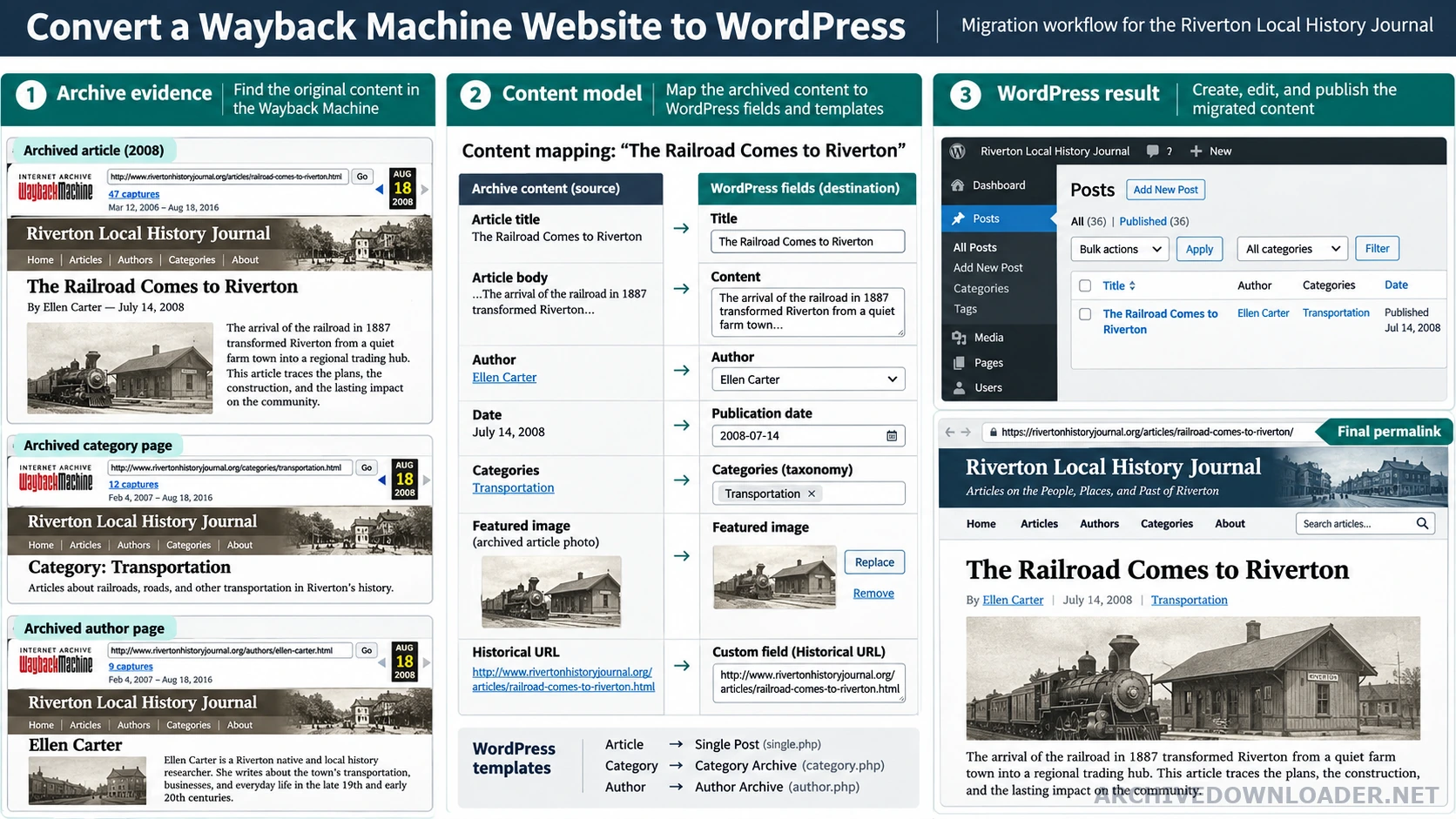
Map recovered material to WordPress
- Repeated editorial pages
- Pages or posts with reusable fields and a shared template.
- Categories and archives
- Taxonomies only when they describe real relationships readers can browse.
- Recovered media
- Media Library items with source provenance, useful filenames, dimensions, and accurate alternative text.
- Historical routes
- Final permalinks plus specific redirects for paths that cannot be retained.
Map content before importing
Identify posts, pages, categories, authors, dates, featured images, custom fields, and reusable components. Archived HTML rarely labels these cleanly, so a sample-based mapping should be approved before bulk conversion begins. Begin with the complete restoration workflow to inventory templates, media, routes, and unavailable backend behavior before choosing WordPress fields.
Keep URLs intentional
Preserve valuable historical paths where practical. When WordPress cannot reproduce a path cleanly, create a specific permanent redirect. Avoid redirecting every missing URL to the homepage because that hides errors and creates poor search and user signals. Finish with the recovered website SEO checklist to map old URLs to final permalinks, redirects, canonicals, and a clean sitemap.
Test the redirect map before changing DNS. Each old indexable URL should resolve to the closest equivalent new page, return a deliberate not-found response, or remain unavailable for a documented reason. Query-string and trailing-slash behavior should be consistent. Compare the available recovery allowances on the website recovery pricing page before assigning several archived websites to one monthly page-credit pool.
Clean the content
Remove archive wrappers, inline tracking, obsolete embeds, and duplicated headings. Import media into the WordPress library with useful filenames and alternative text based on the actual image. Check that each page has one descriptive H1 supplied by the template.
Classify content before importing it
Create a row for every recovered canonical page and assign a content type, final slug, template family, publication state, source capture, and review owner. Use posts only for genuinely chronological publishing. Use pages for durable hierarchy. Use custom post types when a repeated entity has its own fields and relationships, such as products, team members, projects, or documentation entries.
Do not paste complete recovered pages into a visual editor as one HTML block. Separate headings, body copy, media, metadata, and reusable fields from the theme. This gives editors structured content and allows templates to control navigation, accessibility, schema, and responsive layout consistently.
Map media and historical URLs deliberately
Import only reviewed media that the owner can republish. Give files meaningful names, verify dimensions and MIME types, retain source provenance outside the public caption, and write alternative text that describes the visible purpose of the image. Do not copy an old filename or surrounding keyword into alt text when it does not describe the image.
Preserve a historical path when it remains accurate. When WordPress needs a new permalink, create one specific redirect from the old canonical URL to the closest equivalent page. Record URLs with no replacement as intentional 404 or 410 responses. Test feeds, category archives, attachment pages, author archives, and search results so the migration does not create duplicate indexable surfaces.
Verify the WordPress result as a publishing system
Test representative pages while signed out, then edit them through the dashboard and confirm that the public template updates correctly. Review menus, breadcrumbs, pagination, media sizes, responsive images, forms, user roles, backups, updates, and caching. Scan the theme and recovered files, remove obsolete third-party scripts, and keep secrets out of the theme and repository.
Crawl the staged site and compare it with the approved URL map. Check response codes, redirects, titles, H1 headings, canonicals, internal links, sitemap entries, and robots directives. The migration is complete only when editors can maintain structured content and the public routes behave as planned, not when imported HTML merely resembles the archive replay.
WordPress conversion mapping
Convert repeated archived structures into editable WordPress content models instead of pasting complete historical pages into one content field.
Content model inputs
- Examples of every page, post, taxonomy, media, author, date, and reusable layout type.
- The final permalink map and a one-to-one redirect plan for changed public URLs.
- Editorial requirements for blocks, fields, menus, forms, search, and media management.
WordPress handoff
A content-model worksheet connecting archived elements to WordPress templates, fields, taxonomies, media, and final URLs.
Migration blocker
Stop when the plan requires abandoned themes or plugins, stores layout markup as uneditable blobs, or loses original URL relationships.
Plan the WordPress rebuild
Map historical routes and repeated content before selecting the complete managed rebuild.
Compare rebuild plans